 Aisbear in action
Security Response Assistant
Accelerate incident response with automated triage, analysis, and containment suggestions.
CATEGORIES
SHARE
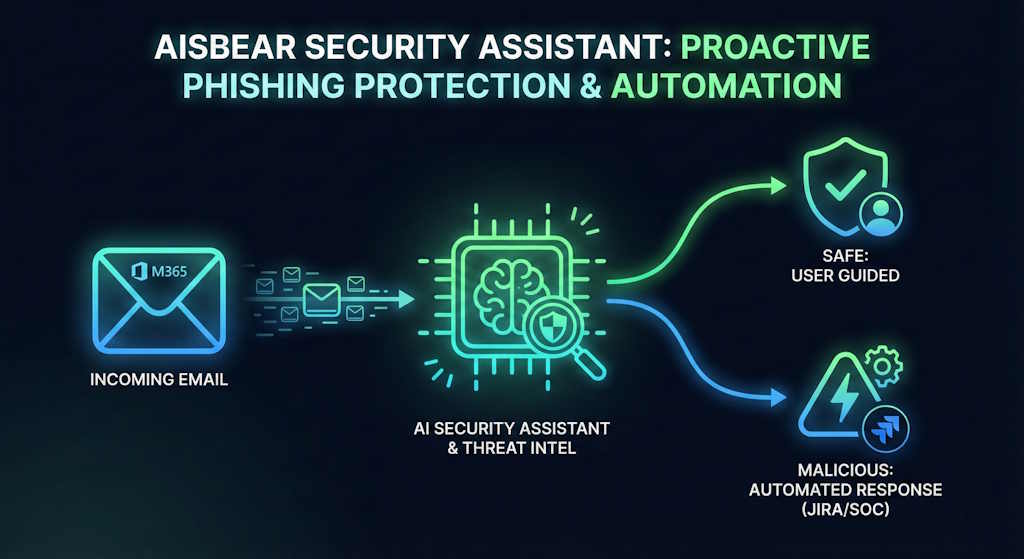
In Aisbear, the Security Assistant adds an extra layer of protection on top of your existing email filters. Because secure gateways and server-side rules often miss sophisticated phishing campaigns, Aisbear continuously analyzes messages in your Microsoft 365 mailboxes to detect indicators of compromise – especially risky URLs.
A built-in connector pulls new suspicious emails, classifies them in an AI-driven security flow. For each email, Aisbear extracts links from the body and attachments and checks them against your preferred threat-intelligence services (e.g. URLScan, VirusTotal). These signals are combined into a single malicious score, which determines whether the email is likely safe, suspicious, or malicious.
On top of that, an AI Security Assistant reviews the technical metadata and the text itself using a large language model, looking for phishing patterns, social-engineering tricks, and suspicious wording. The result is a clear, human-readable verdict for the user: the email is malicious (with explanation) or the email appears safe.
For high-risk messages, Aisbear can automatically trigger your security processes - for example by creating a security incident in Jira and notifying your SOC or security team. All of this runs in a visual, no-code flow editor, so security teams can easily adjust thresholds, add extra checks, or plug in new tools without writing code.
Example User Stories
- "Proactively detects and stops security risks – from phishing emails and suspicious clicks to documents containing company-critical data – using AI classifiers, threat-intelligence checks and automated scoring."
- "Guides people and triggers the right response – turning security policies into step-by-step help for employees and automated incident creation in Jira / SOAR, so every serious case is properly tracked and handled."
Sensitive Data Caught Before It Spreads
An HR specialist uploads a new policy document into Aisbear using a flow that normally publishes content to all employees. As the flow runs, Aisbear triggers a built-in classifier that scans the file and detects company-critical sensitive data (for example, salary details or confidential financial figures).
Instead of silently publishing it, the Security Assistant automatically creates a high-priority event in the SOAR system and routes the document into an approval step for the responsible manager. The manager is notified, reviews the file in Aisbear, and either approves a redacted version for employees or blocks the document entirely — preventing sensitive data from being shared company-wide.
What Should I Do Now?
An employee accidentally clicks on a suspicious link and starts to panic, so they open Aisbear and ask the Security Assistant: "I think I clicked a phishing link, what should I do now?"
The Security Assistant immediately pulls the official incident response playbook and security policies, and replies with a simple step-by-step guide — disconnect from Wi-Fi, don't enter any passwords, call the service desk, and so on — all tailored to the employee's location and device type. With one click, the employee can also let Aisbear create a pre-filled security incident in Jira and notify the security team, so the case is properly tracked and handled.
Security Assistant: Phishing Verdicts in Seconds
An employee receives a suspicious email and isn't sure if it's safe, so they simply forward it to an email connected to Aisbear. The Security Assistant picks up the message, checks all links and attachments against threat-intelligence services, analyzes the headers and text with AI, and returns a clear verdict — the email is malicious (with a short explanation) or appears safe.
For high-risk emails, Aisbear can automatically create a security incident in Jira and notify the SOC team, all configured in a visual no-code flow.
For each email, Aisbear extracts links from the body and attachments and checks them against threat-intelligence services like URLScan and VirusTotal. These results are combined into a single malicious score. On top of that, an AI Security Assistant reviews the technical metadata and the text itself using a large language model, looking for phishing patterns, social-engineering tricks and suspicious wording.